Key benefits
Create backups of your app configurations
Share designs and layouts using team members
Transfer configurations between projects
Build a library of reusable components
Easily back up or share your app settings and layouts.
Create backups of your app configurations
Share designs and layouts using team members
Transfer configurations between projects
Build a library of reusable components
A practical setup flow for turning this capability into a production-ready app experience.
Open your FluxBuilder project and enable Import & Export from the relevant app feature or integration area.
Adjust content, platform connections, permissions, and visual settings so the feature matches your app workflow.
Use live preview to test the mobile flow, then publish your update when the app experience is ready.
Short answers for teams evaluating Import & Export inside a FluxBuilder app.
Continue exploring capabilities from the same category or use-case cluster.

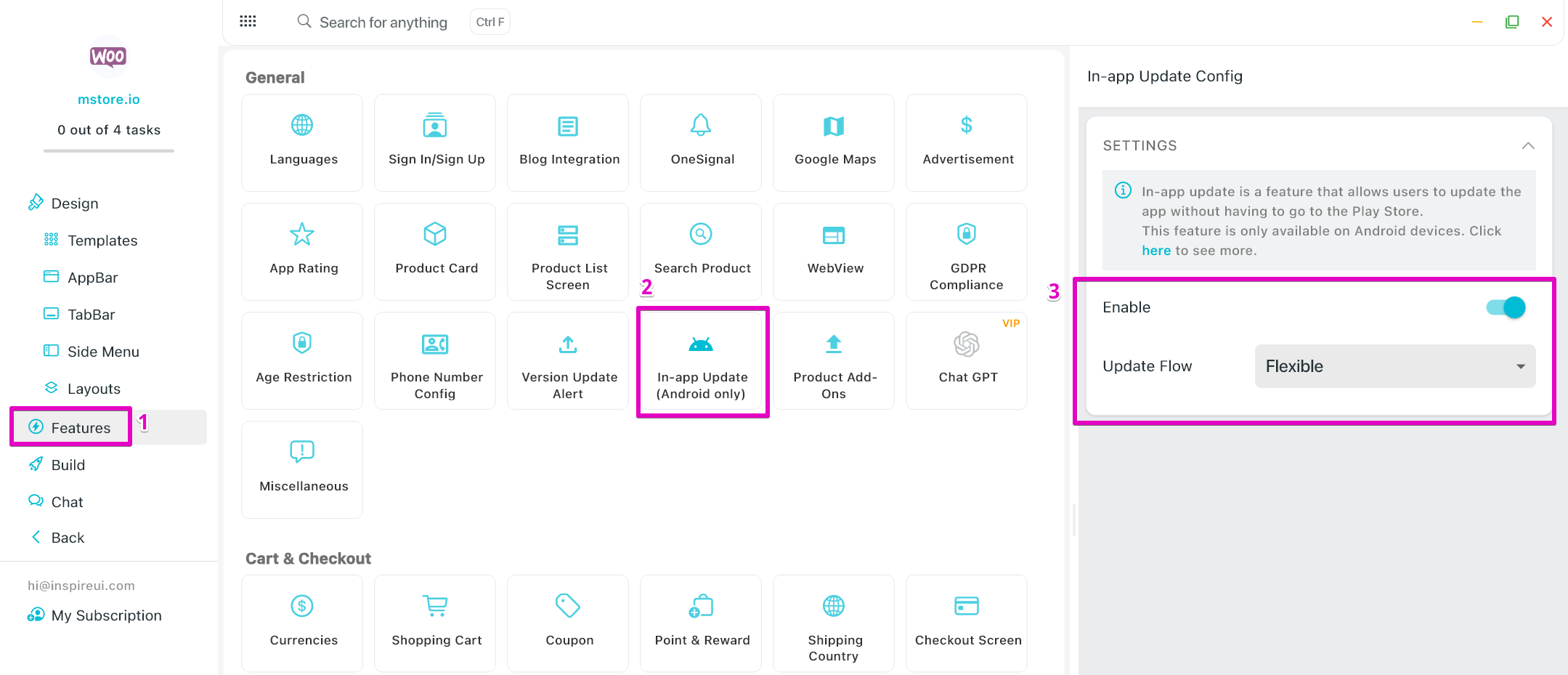
Allow users to update the app directly within the app without going to Google Play Store.
Explore
Get full access to the source code that's 100% compatible with FluxStore apps, enabling complete customization and flexibility for your mobile application development.
ExploreDownload FluxBuilder, connect your website, and configure app features visually before publishing to iOS and Android.